WD Data Recovery: How to Recover Data from a Western Digital Hard Drive 2026

5 mins read

Updated on 2026-05-20 16:38:24 to Hard Drive

WD data recovery is often needed after files are accidentally deleted, a drive is formatted, or a WD hard drive becomes corrupted or inaccessible. Since many users store backups, photos, videos, and work documents on WD external drives like My Passport, losing access to important files can be frustrating and disruptive.

The good news is that data recovery is still possible in many cases if the drive has not been physically damaged or overwritten. In this guide, you will learn the common causes of WD data loss, available recovery methods, and practical tips to help protect your files in the future.

wd data recovery

Common Causes of Data Loss on WD Hard Drives

Data loss on Western Digital drives can happen for many different reasons. Some problems are software related and easier to recover from, while others involve physical hardware damage. Common causes include:

  • Accidental deletion of files or folders
  • Formatting the WD drive by mistake
  • Virus or malware attacks damaging files
  • File system corruption after unsafe removal
  • Power outages during file transfers
  • Partition loss or RAW drive errors
  • Operating system crashes
  • WD My Passport is not being recognized
  • Firmware issues or bad sectors
  • Physical drops or liquid damage

In many situations, the files are not immediately erased from the drive. Instead, the storage space is simply marked as available. It means recovery may still be possible if new data has not overwritten the lost files.

Different WD models may show slightly different failure symptoms, but recovery principles generally remain consistent across devices.

Is WD Hard Drive Data Recovery Possible?

Yes, WD hard drive data recovery is possible in many situations, especially when data loss is caused by logical issues instead of severe hardware failure. Early detection of drive issues can significantly improve data recovery success before files become permanently overwritten.

The recovery success rate depends on what caused the problem and whether the drive continues to function properly.

Logical Data Loss (Usually Recoverable)

Logical data loss refers to situations where the storage device still works physically but files become inaccessible because of software or file system problems. Common recoverable cases include:

  • Deleted files removed from the Recycle Bin
  • Formatted WD external drives
  • Corrupted partitions
  • RAW file system errors
  • Virus-related file disappearance
  • Lost partitions after Windows updates
  • Drives asking to be formatted before opening
  • Damaged file systems after unsafe ejection

These cases are usually recoverable because the original file data often remains on the disk until overwritten. If this happens, stop using the drive immediately and avoid copying new files onto it.

Using reliable recovery tools immediately after data loss increases chances of restoring important files from WD hard drives.

Physical Drive Damage (More Difficult)

Physical damage recovery is much more complicated because the hardware itself becomes damaged. Common physical damage symptoms include:

  • Clicking or grinding noises
  • Drive not spinning properly
  • Burnt circuit boards
  • Water damage
  • Severe overheating
  • USB connector failure
  • Drive not detected in BIOS

In these cases, software recovery alone may not work. Professional recovery services are often required because opening the drive incorrectly can permanently destroy the stored data.

⚡ How to Recover Lost Data from a WD Hard Drive?

If the drive is still detectable and does not have severe physical damage, WD data recovery may be possible with professional recovery software like 4DDiG Hard Drive Recovery. To improve recovery chances, it is recommended to avoid saving new data to the affected WD drive after data loss occurs. This is why 4DDiG is recommended:

FREE DOWNLOAD

Secure Download

FREE DOWNLOAD

Secure Download

  • Deleted & Formatted File Recovery: Recover WD files lost due to accidental deletion, formatting, partition loss, or corrupted storage devices.
  • Support for WD Drives: Work with WD internal HDDs, SSDs, WD My Passport drives, and USB-connected external hard drives.
  • Multiple File Type Recovery: Restore photos, videos, documents, compressed archives, and other commonly used file formats.
  • Deep Scan Function: Perform deep scans to detect inaccessible, corrupted, or missing partitions more thoroughly.
  • File Preview Before Recovery: Preview recoverable files before restoring them to confirm the recovery results.
  • RAW & Corrupted Drive Support: Help recover files from WD drives that become RAW, unreadable, or inaccessible due to file system corruption or virus attacks.
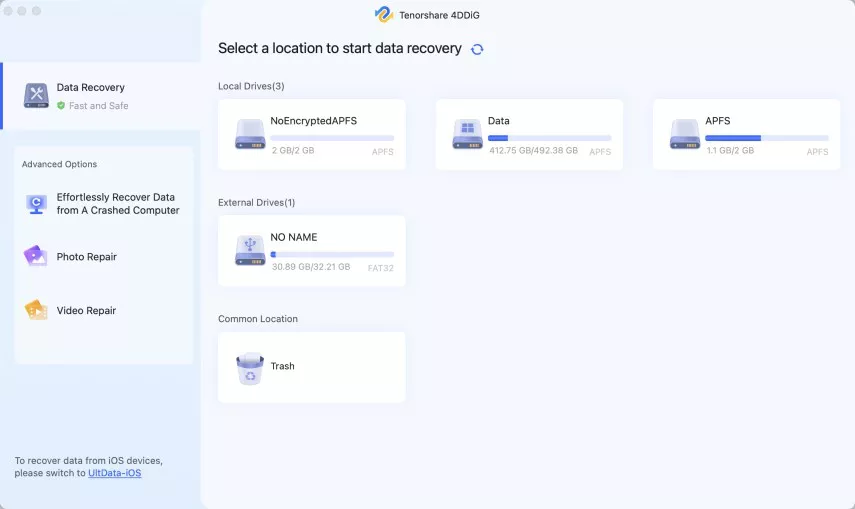
  • Connect your WD drive to the computer using a reliable data cable. Launch 4DDiG and select the affected WD hard drive from the list of available drives.

    launch 4ddig and enter interface
  • Now, 4DDiG will scan your WD hard drive to look for recoverable files, and this may take some time. However, you may filter files with the “File Type” feature to quickly find the desired files.

    click type to see all files 4ddig
  • Once the scan finishes, click to preview the recovered files to verify their condition. This step helps confirm whether the data is still intact before recovery. Then, the files you want to restore and click “Recover.”

    preview and recover the files
  • Save the recovered files to a different drive instead of the original WD disk. This prevents overwriting other recoverable data.

    save the recoverable files

This method works well for WD My Passport data recovery, deleted partitions, accidental formatting, and corrupted file systems.

Tips to Prevent Future Data Loss on WD Hard Drives

Preventing data loss is much easier than recovering files after a drive failure. Developing good storage habits can significantly reduce future risks. Here are some practical tips:

  • Always safely eject WD external drives before unplugging
  • Keep regular backups of important files
  • Avoid dropping or shaking portable drives
  • Use antivirus software to prevent malware attacks
  • Monitor drive health using SMART tools
  • Replace old drives showing warning signs
  • Avoid sudden power interruptions during file transfers
  • Store drives in cool and dry environments
  • Do not ignore unusual clicking sounds or slow performance
  • Keep enough free space available on the drive

For users storing critical work or personal files, maintaining both local and cloud backups provides better protection against unexpected failures.

FAQs

Q1: Can I recover data from a failed WD drive?

Yes, recovery may still be possible depending on the type of failure. Logical failures such as formatting, deletion, or corruption are often recoverable using WD data recovery software. However, physically damaged drives may require professional repair services.

Q2: How much does Western digital data recovery cost?

The cost varies based on the recovery method. Software-based recovery tools are usually much cheaper and suitable for logical data loss. Professional recovery services for physically damaged drives can range from hundreds to thousands of dollars depending on the damage severity.

Conclusion

WD data recovery is possible in many cases, especially when the drive still functions and the lost data has not been overwritten. Problems like accidental deletion, formatting, corruption, or RAW partitions can often be resolved using professional recovery software.

If you are facing WD My Passport data recovery problems or inaccessible WD external drives, 4DDiG Data Recovery offers a practical and beginner-friendly solution to restore important files safely. Acting quickly and avoiding further use of the affected drive can greatly improve the recovery success rate.

FREE DOWNLOAD

Secure Download

FREE DOWNLOAD

Secure Download

William Bollson (senior editor)

William Bollson, the editor-in-chief of 4DDiG, devotes to providing the best solutions for Windows and Mac related issues, including data recovery, repair, error fixes.

(Click to rate this post)

You rated 4.5 ( participated)