What Is a WMF File? Complete Guide to Open, Edit, and Convert It

5 mins read

Updated on 2026-07-10 10:28:31 to Wiki

WMF files are not very common, and many users get confused about what a WMF file is and how to use it. Although WMF files have been around for decades, they are still supported by many Windows applications and are commonly found in clip art, technical drawings, and Office documents.

Our guide explains the WMF file format, its common uses, how to open and edit it, how it compares with EMF, and how to recover deleted WMF files.

what is a wmf file

What Is a WMF File?

A WMF (Windows Metafile) file is a vector graphics format developed by Microsoft for the Windows operating system. Unlike bitmap images such as JPG or PNG, which store pictures as individual pixels, WMF files mainly store drawing instructions.

These instructions tell Windows applications how to render shapes, lines, text, and images at different sizes without significantly reducing quality.

If you’re asking what is the WMF file format, think of it as a container that can hold both vector drawing commands and bitmap images. Because of this combination, WMF files were widely used for clip art, diagrams, and graphics embedded in Microsoft Office documents.

WMF File Structure

A WMF file typically consists of several components:

  • File header that stores metadata such as file type and size.
  • Drawing records containing commands for lines, shapes, text, and other graphical elements.
  • Bitmap data (optional) for embedded raster images.
  • Object definitions such as brushes, fonts, pens, and colors used while rendering the image.

Rather than storing every pixel individually, Windows interprets these drawing commands whenever the file is opened.

Key Features of WMF Files

Some of the most important features of WMF files include:

  • Vector-based graphics: Images can usually be resized with little or no loss of quality.
  • Support for bitmap images: WMF files may also contain raster graphics when needed.
  • Native Windows compatibility: Most Microsoft Windows applications recognize the format.
  • Compact file sizes: Vector graphics generally require less storage than high-resolution bitmap images.
  • Microsoft Office integration: WMF files work well with Word, PowerPoint, and other Office applications.

Although newer formats like SVG and EMF have become more common, WMF remains compatible with many legacy Windows programs.

Common Uses of WMF Files

Although WMF files are not as widely used as they once were, they still appear in many professional and business environments. Their ability to store scalable graphics makes them useful in several scenarios. Common uses include:

Microsoft Office graphics

WMF files are often inserted into Word, Excel, and PowerPoint documents because they scale well while maintaining good visual quality.

Clip art libraries

Older versions of Microsoft Office and many graphic collections use WMF files to store reusable illustrations and icons.

Technical diagrams

Engineers and technical writers sometimes use WMF graphics for flowcharts, schematics, and instructional diagrams.

Desktop publishing

Publishing software can import WMF graphics into brochures, manuals, and reports without significant quality loss.

Graphic design workflows

Some design applications still support WMF for exchanging vector graphics with legacy Windows software.

Printing applications

Since vector graphics remain sharp when enlarged, WMF files are suitable for certain printing tasks and documentation.

How to Open a WMF File on Windows and Mac?

Opening a WMF file is usually straightforward on Windows because Microsoft applications include built-in support.

Mac users can also access WMF files, although they may need additional software or convert the file into a more compatible format first.

On Windows:

Below are the methods to open WMF files on Windows with Photos or Office:

1. Use Microsoft Paint or Photos

Windows includes applications that can display many WMF files without installing additional software. Paint also allows basic editing after opening the image.

Here is how to view WMF files with Paint or Photos:

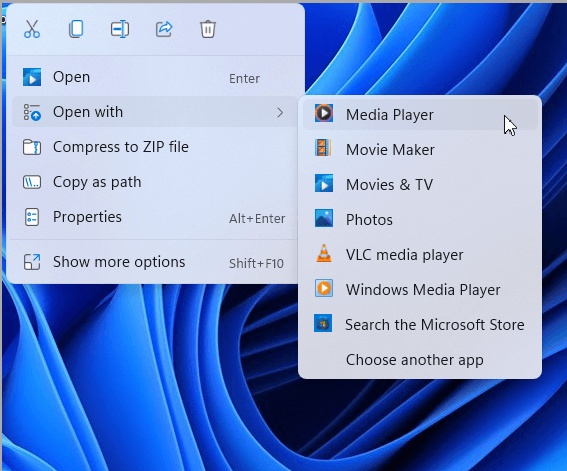
  • Locate the WMF file in File Explorer.

  • Right-click the file and select "Open with".

    open wmf file with paint tool
  • Choose "Paint" or "Photos" to open and view the image.

Paint provides simple editing features, while Photos is mainly intended for viewing.

2. Open with Microsoft Office

Microsoft Office applications support WMF graphics, making them ideal for documents and presentations.

  • Open Microsoft Word or PowerPoint and create a new document or open an existing one.

  • Click "Insert, " then choose "Pictures" and select "This Device".

    open wmf file with microsoft office
  • Browse to your WMF file and click "Insert".

  • The graphic will appear inside your document or presentation.

This is one of the easiest methods to open a WMF file for use in Office projects.

On Mac:

Although macOS does not include native support for WMF in Preview, there are still several ways to access the file.

1. Open with Microsoft Word or PowerPoint

If Microsoft Office is installed on your Mac, it can often display imported WMF graphics.

  • Launch Microsoft Word or PowerPoint. Open or create a document.

  • Select "Insert," then choose "Pictures" and pick your source.

    open wmf file on mac via office
  • Locate the WMF file and insert it into the document.

  • If supported, the image will display normally.

2. Convert Before Opening

If your Mac applications cannot open WMF files directly, converting them to PNG or PDF is usually the simplest solution. Online conversion services such as CloudConvert make this process quick and straightforward.

  • Open your browser and visit CloudConvert. Click "Select File" and upload the WMF file.

    convert wmf file before opening it
  • Choose "PNG", "PDF", or another compatible output format that you need and click "Convert".

  • Wait for the conversion to finish and download the converted file.

  • Open it normally using Preview or another compatible application.

How to Edit a WMF File?

While Microsoft Paint allows limited modifications, dedicated vector editors provide much more control over WMF graphics. One of the best free options is Inkscape, which supports editing many WMF files after importing them.

  • Download and install Inkscape and launch the application.

  • Click "File" "Open" to browse to the WMF file and import it into Inkscape.

    edit a wmf file in inkscape
  • Use the editing tools to modify shapes, colors, text, or vector paths.

  • Save the project or export it to formats such as SVG, PNG, or PDF.

If you want to edit WMF file, Inkscape offers an excellent balance between functionality and ease of use without requiring a paid license.

WMF vs EMF: What's the Difference?

WMF and EMF are both Microsoft vector graphics formats, but EMF is a newer and more capable standard.

  • Feature
  • WMF
  • EMF
  • Full Name
  • Windows Metafile
  • Enhanced Metafile
  • Release
  • Windows 3.x
  • Windows NT
  • Graphics Quality
  • Good
  • Better
  • Color Support
  • Limited
  • Improved
  • Device Independence
  • Basic
  • Advanced
  • File Efficiency
  • Smaller
  • Slightly larger
  • Windows Compatibility
  • Excellent
  • Excellent
  • Modern Software Support
  • Moderate
  • Better
  • Best Use
  • Legacy graphics
  • Modern Windows graphics

Summary: If you are working with older Windows documents, WMF remains useful. For newer workflows requiring higher-quality graphics and improved compatibility, EMF is generally the better option.

⚡ How to Recover Deleted or Lost WMF Files?

If a WMF file has been accidentally deleted or lost due to a system crash, there is still a good chance it can be recovered, provided the storage space has not been overwritten. The sooner you stop using the affected drive, the higher the likelihood of successful recovery.

A professional recovery tool such as 4DDiG data recovery can scan hard drives, SSDs, USB drives, SD cards, and other storage devices to locate deleted WMF files.

Besides vector graphics, it supports recovering PNG, JPG, SVG, MP4 and hundreds of additional file formats. Its deep scan technology can detect files that are no longer visible in File Explorer, while the preview feature allows you to confirm recoverable files before restoring them.

FREE DOWNLOAD

Secure Download

FREE DOWNLOAD

Secure Download

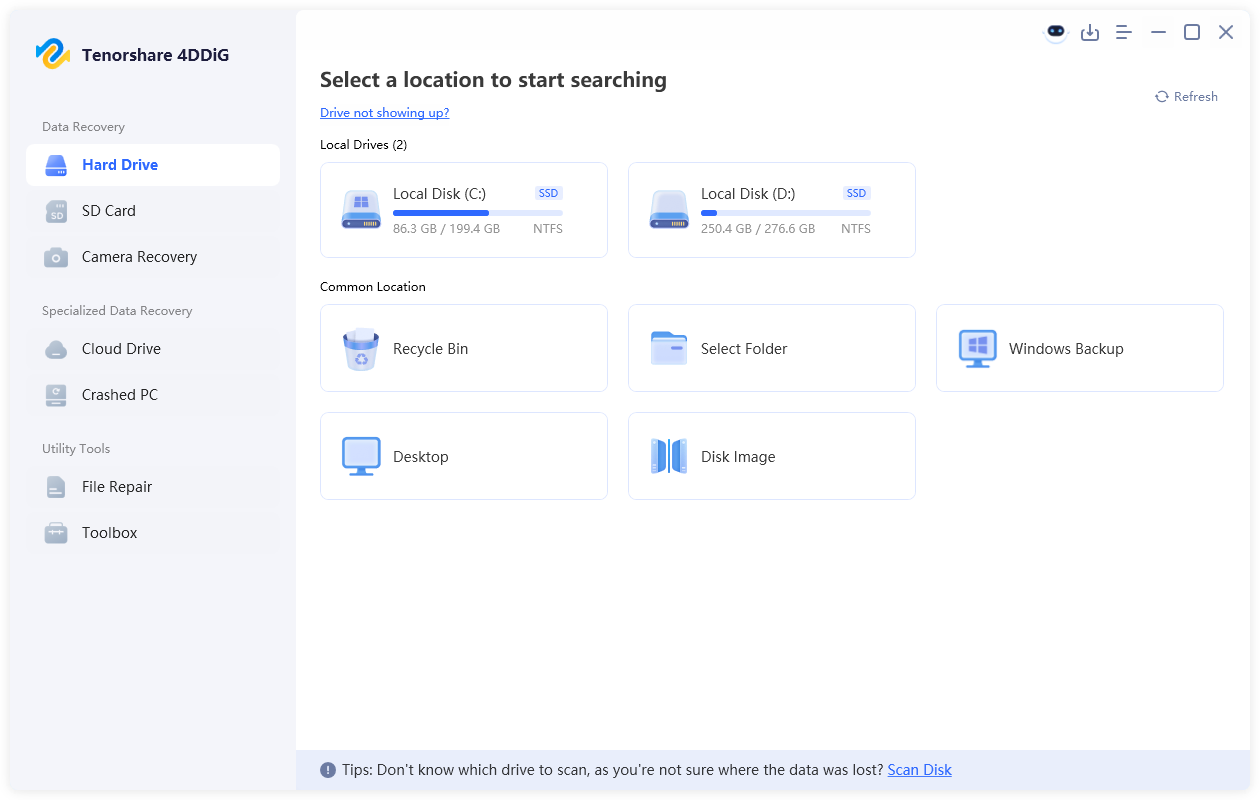
  • Install 4DDiG on your computer, then launch it. Now, select the drive where you stored your WMF files, and 4DDiG will begin scanning it.

    launch 4ddig and enter interface
  • Wait for the scan to complete, then use the "Filters" or "Search" feature to quickly locate your lost files.

    click type to see all files 4ddig
  • When you find a recoverable file, double-click it, and you can see its preview to ensure that the WMF file contents are those that you need. Click the "Recover" button from the bottom right to recover that file.

    preview and recover the files
  • Finally, choose a different and more secure location and click "Save Now".

    save the recoverable files

FAQs About WMF Files

What is the WMF data type?

WMF is a Microsoft vector graphics file format that stores drawing commands, graphical objects, and optional bitmap data. It is primarily used for scalable graphics in Windows applications.

Are WMF files still used today?

Yes. Although newer formats such as SVG and EMF are more common, WMF files are still used in legacy Microsoft Office documents, clip art collections, technical illustrations, and some Windows applications.

How to convert WMF to PNG?

You can convert WMF to PNG using graphic software such as Inkscape or Adobe Illustrator, or use an online conversion service like CloudConvert. Upload the WMF file, choose PNG as the output format, convert it, and download the resulting image.

Conclusion

Understanding a WMF file makes it much easier to work with legacy Windows graphics and Microsoft Office documents. Although WMF is an older vector format, it remains useful for scalable illustrations, diagrams, and clip art. You can open WMF files with Windows applications, convert them for use on Mac, or edit them using Inkscape.

If your WMF files are accidentally deleted or become inaccessible, 4DDiG can help to recover them along with many other important file types.

FREE DOWNLOAD

Secure Download

FREE DOWNLOAD

Secure Download

William Bollson (senior editor)

William Bollson, the editor-in-chief of 4DDiG, devotes to providing the best solutions for Windows and Mac related issues, including data recovery, repair, error fixes.

(Click to rate this post)

You rated 4.5 ( participated)