Master Kling AI 2.6 in 2026: Prompt Guide, Free Access & Beginner Tutorial
💡 Summarize with AI:
AI video generation has advanced rapidly, and Kling AI 2.6 is one of the most talked-about updates in 2026. Designed for creators, marketers, and beginners alike, this version brings improved realism, better motion control, and more flexible prompt handling.
If you are curious about what Kling AI 2.6 offers, how to access it for free, and how to write effective prompts, this guide walks you through everything step by step in a practical, beginner-friendly way.
Part 1. What's New in Kling AI 2.6 (2026 Update)
Kling AI 2.6 is not just a minor patch; it introduces noticeable improvements over earlier Kling AI versions. These updates focus on visual realism, prompt accuracy, and creative control, especially for short-form and cinematic video generation. The major improvements in Kling AI 2.6 include:
- Enhanced motion consistency: Character movements are smoother and more natural, reducing jitter and frame inconsistency seen in older versions.
- Improved lip-sync and dialogue accuracy: Speech alignment with facial movement is more precise, especially for single-character and interview-style videos.
- Stronger prompt comprehension: Kling AI 2.6 better understands scene structure, timing, and descriptive details, reducing the need for repeated prompt tuning.
- Longer and more stable video generation: The model handles extended clips with fewer visual artifacts and less scene drift.
- Better image-to-video animation: Static images can now be animated with more depth, subtle motion, and realistic camera effects.
- Refined lighting and environmental effects: Shadows, reflections, rain, fog, and ambient lighting look more cinematic and believable.
Overall, Kling AI 2.6 positions itself as a more creator-friendly AI video model, especially for storytelling, vlogs, and atmospheric content.
Nano Banana Pro: Free Access, Best Prompts & Full 2026 Guide
Part 2. Kling AI 2.6 Pricing & Cost
Before using Kling AI 2.6 regularly, it’s important to understand its pricing structure. Kling AI offers both free access and paid subscription tiers, allowing users to scale usage based on their needs.
Kling AI 2.6 Pricing Overview
Kling AI’s pricing typically revolves around credits, generation limits, and output quality.
Free users can access Kling AI 2.6 with daily limits, while paid plans unlock faster generation, higher resolution, and priority access. Please note that the pricing may vary by region and promotions in 2026.
Part 3. How to Access Kling AI 2.6 for Free in 2026 (Beginner Tutorial)
If you are new to AI video generation, starting with free access is the safest way to learn Kling AI 2.6. The platform allows beginners to test core features without an upfront payment.
Step-by-Step: Free Access to Kling AI 2.6
Here are the complete steps to access Kling AI 2.6 for free:
-
Create a Kling AI account
Visit the official Kling AI platform and sign up using email or a supported social account. Upon successful signup, you will get your free credits.
-
Select the Kling AI 2.6 model.
In the video generation interface, choose version 2.6 from the model selection menu. Now you can enter your prompt and generate videos with Kling AI using your free daily credits.
Common Beginner Mistakes and Fixes
As a beginner, you may make some mistakes with Kling AI that may affect your experience. So, in this section, we will discuss some common beginner mistakes and their fixes:
Mistake: Overloading prompts with too many ideas
Focus on one scene, one action, and one mood per prompt.
Mistake: Ignoring motion or camera direction
Add simple motion instructions like “slow camera pan” or “subtle character
movement.”
Mistake: Expecting perfect results on the first try
Treat free access as an experimentation phase and refine prompts gradually.
Part 4. Kling AI Prompt Tips & Best Practices for Generating Videos
Prompt quality directly determines output quality. Kling AI 2.6 responds best to structured, intentional prompts rather than vague descriptions.
Why Prompts Matter in Kling AI 2.6
Kling AI does not “guess” creative intent; it interprets instructions literally. Clear prompts reduce randomness, improve visual consistency, and ensure the generated video aligns with your vision.
Recommended Kling AI Prompt Structure
A strong Kling AI 2.6 prompt usually includes:
Scene description: Setting, environment, and atmosphere
Subject details: Characters, objects, or focal elements
Action and motion: What moves and how
Camera behavior: Static, pan, zoom, close-up
Audio direction: Dialogue, ambient sounds, or silence
Style and mood: Cinematic, realistic, minimalist, etc.
Keeping prompts structured but concise helps Kling AI 2.6 generate more predictable and high-quality results.
Part 5. Best Kling AI Prompts: 5 Examples for Different Scenarios in 2026 (Copy & Paste)
Below are ready-to-use Kling AI prompts for common creative scenarios.
1. ASMR Style (Detailed Sound Effects, No Speech)
This prompt focuses on immersive sound design without dialogue, ideal for relaxation or background content.
Close-up cinematic shot of hands slowly handling paper and fabric on
a wooden table. Soft rustling sounds, gentle tapping, and subtle
texture noise. No speech, no music. Calm lighting, shallow depth of
field, realistic motion.Why It’s Representative: It highlights Kling
AI 2.6’s improved audio realism and fine motion control.
2. Ambient Rainy Window Atmosphere (Environmental Sounds Only)
Perfect for mood videos or study ambiance.
Static camera view through a window during nighttime rain. Raindrops
sliding down glass, distant city lights blurred. Ambient rain sound
only, no voices. Soft reflections, cinematic lighting, slow
atmospheric motion.Why It’s Representative: Demonstrates environmental
effects and lighting improvements in Kling AI 2.6.
Why It’s Representative: Demonstrates environmental effects and lighting improvements in Kling AI 2.6.
3. Single Character Vlog Dialogue (Lip-Sync Focus)
Designed for talking-head or influencer-style content.
Single person facing camera indoors, speaking naturally to the
audience. Accurate lip-sync, realistic facial expressions, subtle head
movement. Clean background, neutral lighting, clear spoken
dialogue.Why It’s Representative: Shows advancements in lip-sync and
facial animation.
Why It’s Representative: Shows advancements in lip-sync and facial animation.
4. Multi-Character Interview Dialogue (Alternating Speakers)
Two people sitting across a table having a conversation. Alternating
speakers with accurate lip-sync. Natural pauses, realistic gestures.
Soft studio lighting, stable camera, conversational tone.Why It’s
Representative: Highlights Kling AI 2.6’s ability to handle multiple
speakers.
Why It’s Representative: Highlights Kling AI 2.6’s ability to handle multiple speakers.
5. Image-to-Video Animation (Animate a Static Photo with Audio)
Useful for interviews, podcasts, or discussion scenes.
Animate the provided photo with subtle camera movement and gentle
background motion. Maintain original facial features and colors. Add
soft, ambient background sound. Cinematic style, realistic depth.Why
It’s Representative: Showcases image-to-video capabilities introduced
in newer versions.
Why It’s Representative: Showcases image-to-video capabilities introduced in newer versions.
⚡ Bonus Tip: How to Create AI Stunning Photos with an AI Tool in One Click
While Kling AI 2.6 excels at video generation, many creators also need high-quality images for thumbnails, posters, and social media. This is where 4DDiG AI Image Style Transfer becomes a powerful complement.
4DDiG AI Image Style Transfer includes ready-made viral style templates that allows users to create, expand, and stylize images in just one click (prompts are optional). Powered by Midjourney, it can generate new visual elements with precision, producing results comparable to advanced tools.
Popular Image Styles You Can Select from 4DDiG
- Instantly apply ready-made styles from a built-in gallery.
- Transform couples into romantic or cinematic scenes.
- Convert pets into cute Pixar-like 3D cartoons or fun astronauts.
- Give portraits an Avatar Na’vi-style fantasy look.
- Create playful toy, mini, or viral meme versions.
- Turn photos into glamorous K-pop idol shots.
- Generate epic world travel or cultural scenes.
- Design fully custom styles by describing your idea in plain words. 下载按钮
Steps: Turn a Picture into a New Year Photo Using 4DDiG
-
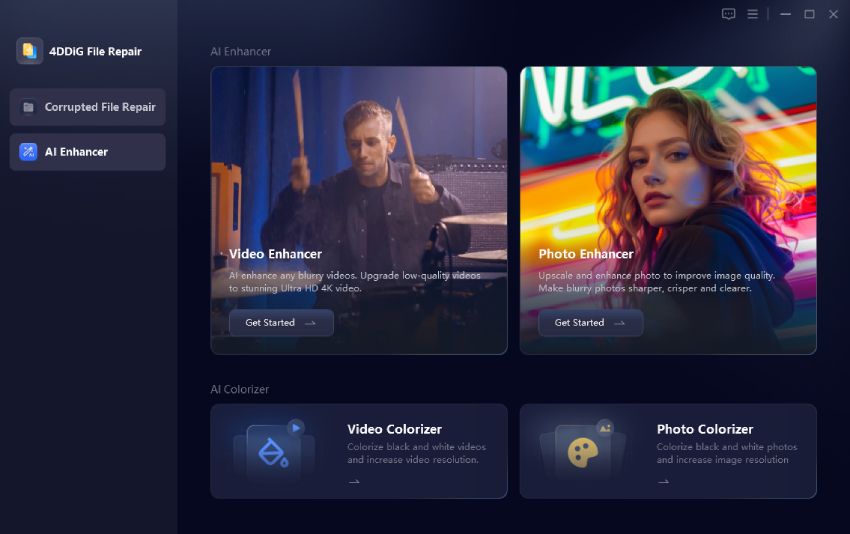
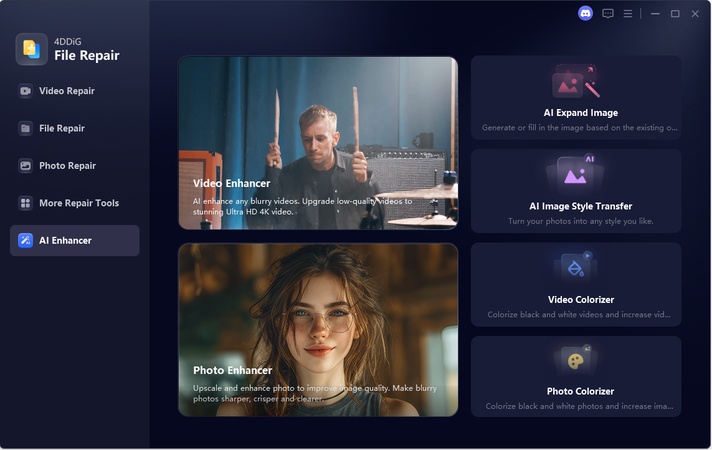
Download and install the 4DDiG File Repair Software on your computer. Launch it and click “AI Enhancer” from the left and choose the “AI Image Style Transfer” feature.
FREE DOWNLOADSecure Download
-
In the "Theme Plaza," you need to choose the theme for your image, which in this case will be "New Year Celebration", “Dreamy Snowland”, etc. And then you will upload your picture to 4DDiG.
-
Now, 4DDiG will generate your image within a few seconds without giving any prompts as you click "Generate”.
Dreamy Snowland Portrait
This one-click approach is ideal for creators who want fast, visually appealing images without complex prompt engineering.
Conclusion
Kling AI 2.6 represents a major step forward in AI video generation, offering better motion, clearer audio alignment, and more reliable prompt interpretation. With free access options, structured prompt techniques, and ready-to-use examples, beginners can start creating confidently in 2026.
For creators who also need stunning visuals beyond video, 4DDiG AI Image Style Transfer provides an efficient way to generate high-quality images in one click, making it a valuable addition to any creative workflow.
Secure Download
Secure Download
💡 Summarize with AI:
You May Also Like
- Home >>
- AI Image Tips >>
- Master Kling AI 2.6 in 2026: Prompt Guide, Free Access & Beginner Tutorial
ChatGPT
Perplexity
Grok